
H
hmily158
This step by step guide will show you how to rip DVD to other video format and convert video for Mac. It includes the following four sections:
1.How to convert DVD to iPhone/iPod/Apple TV/PSP/Mobile Phone formats
2.How to trim, crop the video and do snapshot
3.How to extract audio from DVD to MP3 for iPod and other MP3 players.
4.How to convert video for Mac
Preparation:
What you need is iskysoft DVD Studio Pack For Mac
Download it and install iskysoft DVD Studio Pack For Mac (Intel Version or Power PC Version)
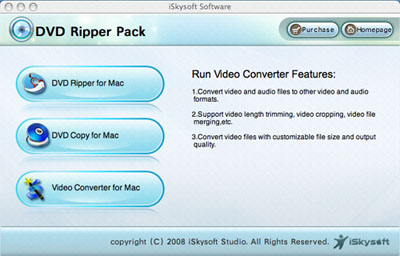
Part 1. How to convert DVD to iPhone/iPod/Apple TV/PSP/Mobile Phone for Mac
Step 1. Instert your DVD disc into your DVD-Rom, then click “DVD Ripper for Mac”. Click “Load DVD” button and add the DVD file(you can also add DVD IFO from your hard disk by click “Load IFO” button)
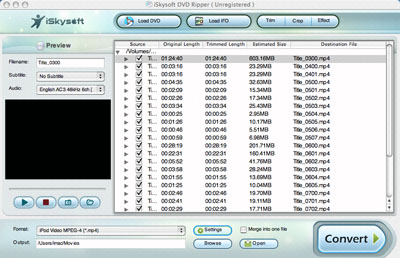
Step 2. This wonderful software can convert DVD to various video formats such as AVI, MP4, FLV, MOV etc. Click the “Format” drop down list to select a format that you need.
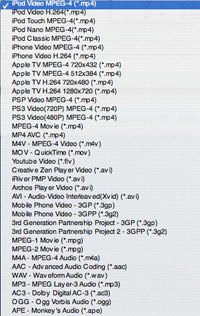
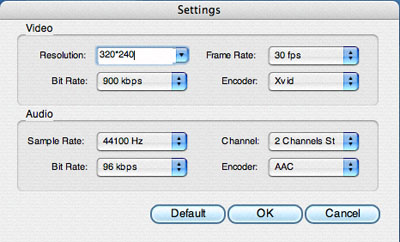
If you are a beginner about portable player, just select a format according to the name of your palyer. For example, if you want to rip your DVD to your iPod video, just select “iPod video MPEG-4 (*.mp4)”, and the default setting works great. If you want to customize the settings, you could click “settings” button and set video resolution, frame rate, bit rate, etc.
Step 3. Subtitle and Audio
Most DVD movies have several subtitles such as english, french, german, etc. You can select one you prefer.
You can select audio as the same way.
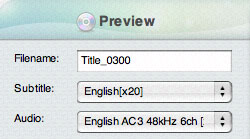
After the above steps, click “convert” to start conversion.
Part 2. How to trim and crop the video and do snapshot
1. Crop
After you load the DVD file, if you want to cut the black edges of the movie, click “Crop” button, then you’ll see a pop up window, you can drag the frame to cut the black edges.
2. Trim
Also you can do trim to choose a part of the DVD to convert.
3. Effect
You can click “effect” button to customize the brightness, saturation, contrast, volume. Etc.
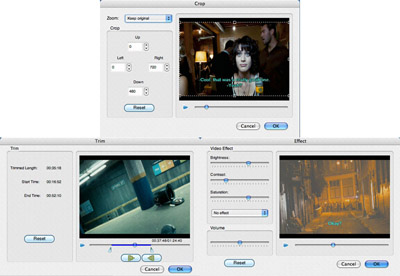
Tips: If you want to combine several chapters into one file, on the main interface, there is a check box “Merge into one file”
Part 3. how to extract audio from DVD
This software can extract and rip audio track to mp3 and other qudio formats. After you load your DVD in the main interface, select the output format as mp3, and then start conversion. If you want to get better music quality, you can select a higher audio bit rate and sample rate in the settings window.
After the conversion, drag the audio file to iTune library connect your iPod to your computer, and click iTunes “file sync iPod”
For psp, just copy the music to the “music ” folder on your memery stick..
Part 4. How to convert video for Mac
Click “Video converter for Mac” in Pic 1. to run iskysoft video converter.
Step 1. Click “Add Files” button to add the video you want to convert. As this iskysoft video converter supports batch conversion, you can add several videos and convert at one time.
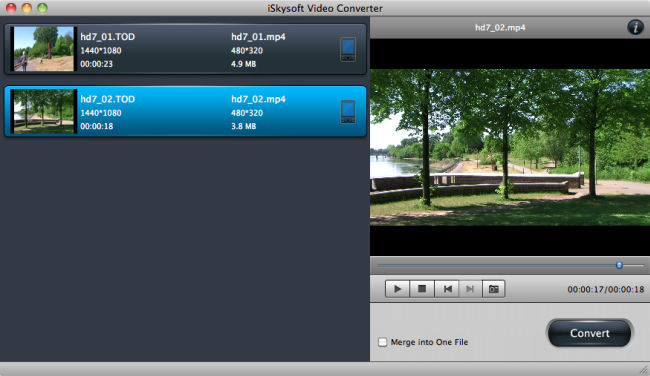
Step 2. you can convert your video into any other popular video formats by clicking “Format” button. Also, if you want to customize your own settings you can get it by clicking “settings” button next to the “Format”
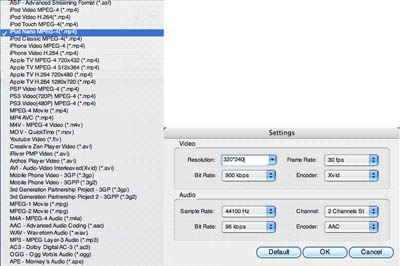
Step 3. click “convert” to start your convetsion
1.How to convert DVD to iPhone/iPod/Apple TV/PSP/Mobile Phone formats
2.How to trim, crop the video and do snapshot
3.How to extract audio from DVD to MP3 for iPod and other MP3 players.
4.How to convert video for Mac
Preparation:
What you need is iskysoft DVD Studio Pack For Mac
Download it and install iskysoft DVD Studio Pack For Mac (Intel Version or Power PC Version)
Part 1. How to convert DVD to iPhone/iPod/Apple TV/PSP/Mobile Phone for Mac
Step 1. Instert your DVD disc into your DVD-Rom, then click “DVD Ripper for Mac”. Click “Load DVD” button and add the DVD file(you can also add DVD IFO from your hard disk by click “Load IFO” button)
Step 2. This wonderful software can convert DVD to various video formats such as AVI, MP4, FLV, MOV etc. Click the “Format” drop down list to select a format that you need.
If you are a beginner about portable player, just select a format according to the name of your palyer. For example, if you want to rip your DVD to your iPod video, just select “iPod video MPEG-4 (*.mp4)”, and the default setting works great. If you want to customize the settings, you could click “settings” button and set video resolution, frame rate, bit rate, etc.
Step 3. Subtitle and Audio
Most DVD movies have several subtitles such as english, french, german, etc. You can select one you prefer.
You can select audio as the same way.
After the above steps, click “convert” to start conversion.
Part 2. How to trim and crop the video and do snapshot
1. Crop
After you load the DVD file, if you want to cut the black edges of the movie, click “Crop” button, then you’ll see a pop up window, you can drag the frame to cut the black edges.
2. Trim
Also you can do trim to choose a part of the DVD to convert.
3. Effect
You can click “effect” button to customize the brightness, saturation, contrast, volume. Etc.
Tips: If you want to combine several chapters into one file, on the main interface, there is a check box “Merge into one file”
Part 3. how to extract audio from DVD
This software can extract and rip audio track to mp3 and other qudio formats. After you load your DVD in the main interface, select the output format as mp3, and then start conversion. If you want to get better music quality, you can select a higher audio bit rate and sample rate in the settings window.
After the conversion, drag the audio file to iTune library connect your iPod to your computer, and click iTunes “file sync iPod”
For psp, just copy the music to the “music ” folder on your memery stick..
Part 4. How to convert video for Mac
Click “Video converter for Mac” in Pic 1. to run iskysoft video converter.
Step 1. Click “Add Files” button to add the video you want to convert. As this iskysoft video converter supports batch conversion, you can add several videos and convert at one time.
Step 2. you can convert your video into any other popular video formats by clicking “Format” button. Also, if you want to customize your own settings you can get it by clicking “settings” button next to the “Format”
Step 3. click “convert” to start your convetsion


